Download Jeetbuzz App for Android & iOS

With an app, you can place your bets no matter where you are. The official Jeetbuzz app is available for Android as an APK file, and iPhone users can open the mobile website and add it to the home screen. The app is free, easy to use for both new and experienced players, has modest system requirements and works well for mobile betting.
Install the Jeetbuzz app and claim a sports welcome bonus of 77% up to ৳7,777!

Download the official Jeetbuzz app for Android and bet on sports in Bangladesh.

Jeetbuzz App Overview

The Jeetbuzz app offers a user-friendly experience for bettors and casino fans. It is designed with useful features, easy navigation, quick transactions and access to a wide range of betting options. Whether you’re into sports betting or casino games, the Jeetbuzz app provides a secure and efficient platform for all your gaming needs.

License Anjouan, License No. ALSI-202410030-FI1
Supported OS Android (APK); iOS via the mobile website
Cost of Downloads Free
App Languages Multiple languages, including English and Bengali
Supported Countries Bangladesh, India, and other select regions
Welcome Bonus for Sports 77% up to ৳7,777
Welcome Bonus for Casino ৳1,077 for slots & fishing, or another casino welcome bonus
Bet Types Pre-match, live betting, betting exchange, parlays, system bets
Support Service Live chat
Customer Support 24/7

Interface of Jeetbuzz App

The Jeetbuzz app has a simple layout that suits both beginners and experienced bettors. Fast-loading menu tabs lead to the sportsbook, the betting exchange, the casino and the cashier, and the design adapts to the screen of your phone.

Pros

  • The interface is clear with logical navigation;
  • Real-time updates on match information and betting odds;
  • Full range of sports and casino betting, including the betting exchange;
  • Biometric login and multiple languages;
  • Local payment methods such as bKash, Nagad and Rocket;
  • Welcome bonuses for sports and casino betting.

Cons

  • There is no separate application for iOS;
  • The APK is not on Google Play, so it has to be installed manually;
  • You must always have a stable internet connection.

Jeetbuzz APK Overview

The Jeetbuzz APK is designed for Android users who want an efficient and reliable betting experience. With an intuitive interface and fast-loading features, the app allows users to place bets on sports and enjoy casino games effortlessly. The APK supports secure transactions and gives access to real-time odds, live betting and the betting exchange. Regular updates keep the app running smoothly. The Jeetbuzz APK is downloaded and installed manually from the official website, as it is not available on the Google Play Store.

App Title Jeetbuzz
App Category Sports Betting & Casino
Operator Northern Lights Limited Holdings Limited
OS Compatibility Android
Android Version A recent Android version is recommended
Download Source Official Jeetbuzz website (APK file)
Key Features Biometric login, multiple languages, exchange betting on cricket, tennis and soccer

Download JeetBuzz App for Android (APK) in 3 Steps

To use the Jeetbuzz app, you first need to download it. This won’t be an issue, as there are step-by-step instructions below for Android, plus a separate guide for iPhone users. Let’s start with Android.

1

Click the “App” Button

Open the website by using the JeetBuzz link in the mobile browser of your device. There, press the “App” button to get redirected to the JeetBuzz app download page and select Android.

Tap the App button on the JeetBuzz website to get the APK.
2

Download the JeetBuzz APK

During the JeetBuzz APK download, your phone may ask for permission: open Android settings and allow installs from unknown sources for your browser to complete the download.

Download Jeetbuzz APK
Download the JeetBuzz APK file for Android.
3

Install the App

After you finish the download of the JeetBuzz APK, simply open the file and press “Install”, then wait for the installation to finish and use the app for your bets.

Install the JeetBuzz mobile app for Android.

System Requirements for Android

The Jeetbuzz app for Android works smoothly on most modern devices. The official download page does not publish exact requirements, so use these values as a guide:

System Requirements A recent Android version
Operating System Android
RAM 1 GB or more recommended
Storage Space Enough free space for the APK and its updates


List of Supported Android Devices

The app runs on most modern Android phones. Here are some examples of devices that handle it easily:

  • Samsung Galaxy S24 Ultra;
  • Google Pixel 9 Pro;
  • OnePlus 12;
  • Xiaomi 14 Ultra;
  • Huawei Pura 70 Ultra;
  • Asus Zenfone 11 Ultra;
  • Vivo X100 Pro;
  • Honor Magic 6 Pro;
  • Oppo Find X6 Pro;
  • Realme GT 6 Pro.
Popular Android smartphones that run the JeetBuzz app.

Jeetbuzz on iOS: Mobile Website Overview

There is no Jeetbuzz app for iOS, but Apple users have access to an adaptive mobile betting and gaming platform. Built for efficient operation and security, the Jeetbuzz mobile website allows users to bet on sports, play casino games and enjoy the same promotions as on the desktop site. With a well-optimized interface, users can easily move between sections. Regular updates keep the site working on current and older iOS versions. Nothing has to be installed: open the website in any browser on your iPhone or iPad, and add it to the home screen if you want an app-like shortcut.

Key features of the Jeetbuzz mobile website for iOS users in Bangladesh.

How to Add Jeetbuzz to the iOS Home Screen in 5 Steps

There is no Jeetbuzz app in the App Store, but iPhone and iPad users can add the mobile website to the home screen and open it like an app. It only takes a few steps:

2

Log In or Sign Up

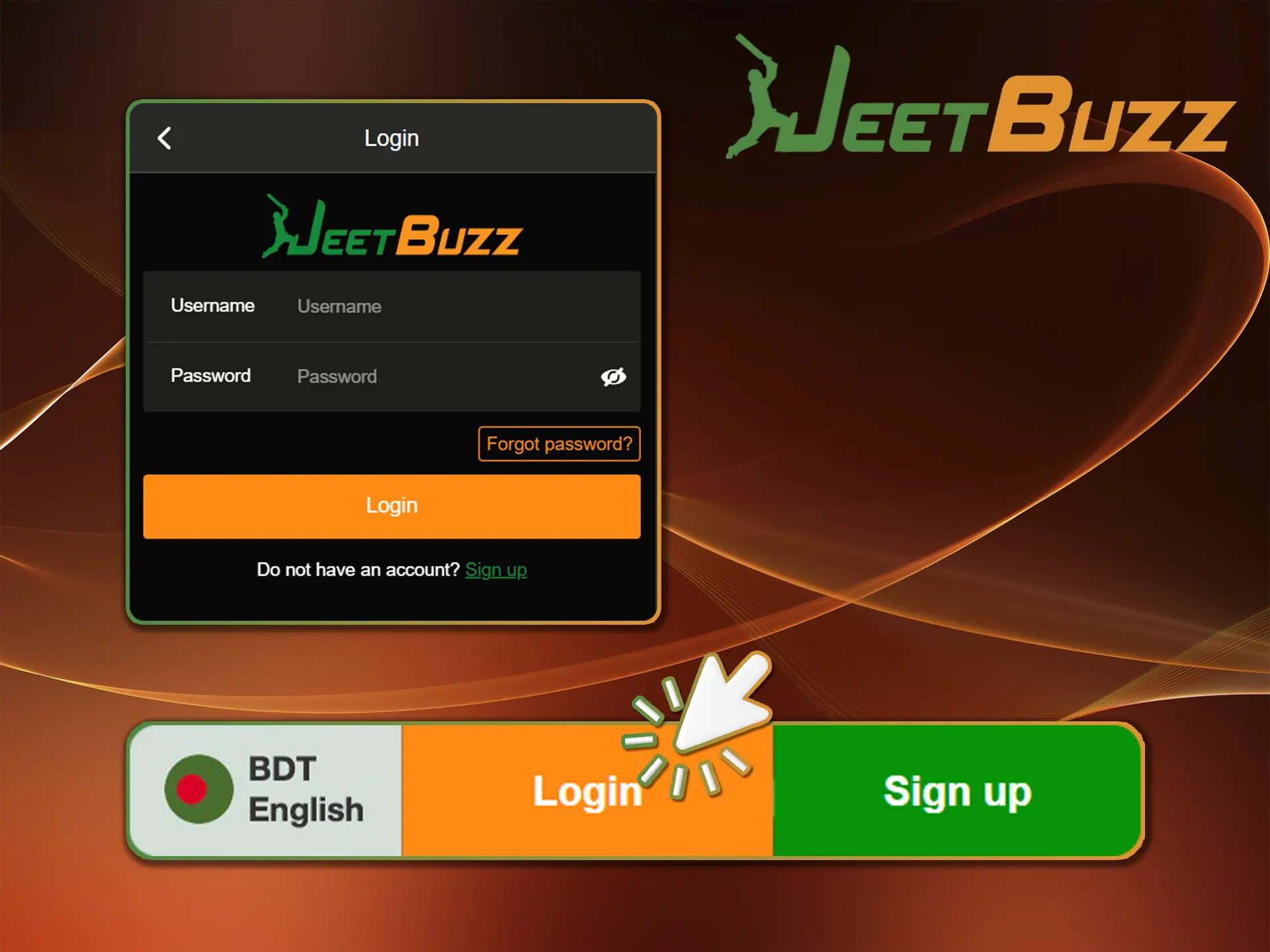
Next, log into your account or register if needed. To log in, tap “Log in” and enter your details. For registration, select “Sign Up” and complete the form.

Log in or sign up to start playing with JeetBuzz.
3

Click Share

Once you are logged in, press the “Share” button in your browser to open the menu.

Tap Share in Safari to add JeetBuzz to the home screen.
4

Select “Add to Home Screen”

Once you open the menu by pressing the “Share” button, the next step will be to press the “Add to Home Screen” button. Doing so will create a shortcut to the Jeetbuzz website directly on your home screen.

Select Add to Home Screen to save the JeetBuzz site on your iPhone.
5

Begin Exploring

All that is left for you to do is to use this shortcut in order to play games as if you are using the actual application.

Start playing on the JeetBuzz mobile site from your iPhone home screen.

System Requirements for iOS (Mobile Website)

The mobile website runs in the browser, so the requirements for iPhone and iPad are modest:

System Requirements A recent iOS or iPadOS version with Safari
Operating System iOS
RAM 1 GB or more
Storage Space No download needed

List of Supported iOS Devices

You can compare your device with the following list to check whether the Jeetbuzz mobile website will run smoothly on your device:

  • iPhone 17;
  • iPhone 17 Pro Max;
  • iPhone 17 Pro;
  • iPhone 16;
  • iPhone 16 Pro Max;
  • iPhone 16 Pro;
  • iPhone 15 Pro Max;
  • iPhone 15 Pro;
  • iPhone 15 Plus;
  • iPhone 15;
  • iPhone 14 Pro Max;
  • iPhone 14 Pro;
  • iPhone 14 Plus;
  • iPhone 14;
  • iPad Pro 11;
  • iPad Air;
  • iPad Mini and more.


iPhone and iPad models that open the JeetBuzz mobile site.

How to Start Playing in the Jeetbuzz App

It doesn’t take long to get going with the Jeetbuzz app. After signing up and funding your account, you get access to the full selection of sports and casino games:

1

Go Through Registration

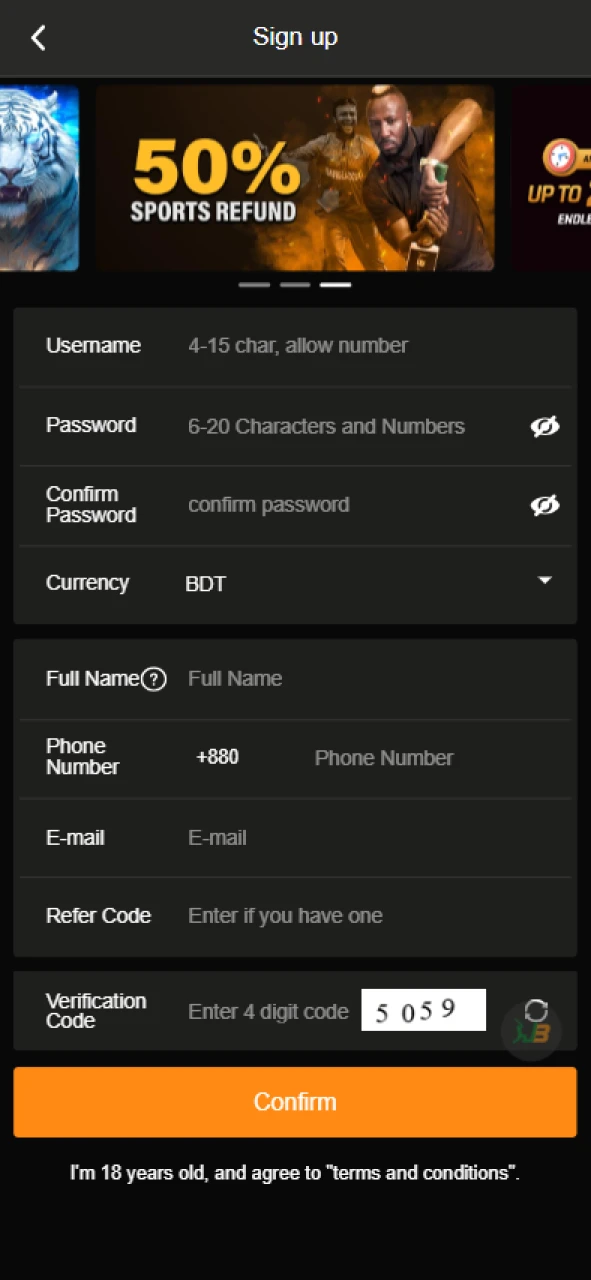
Download the app for Android or open the mobile website on iOS, then tap “Sign Up”. Fill in your details accurately and create a secure password to complete the registration.

Complete the registration process using the Jeetbuzz app.
2

Make a Deposit

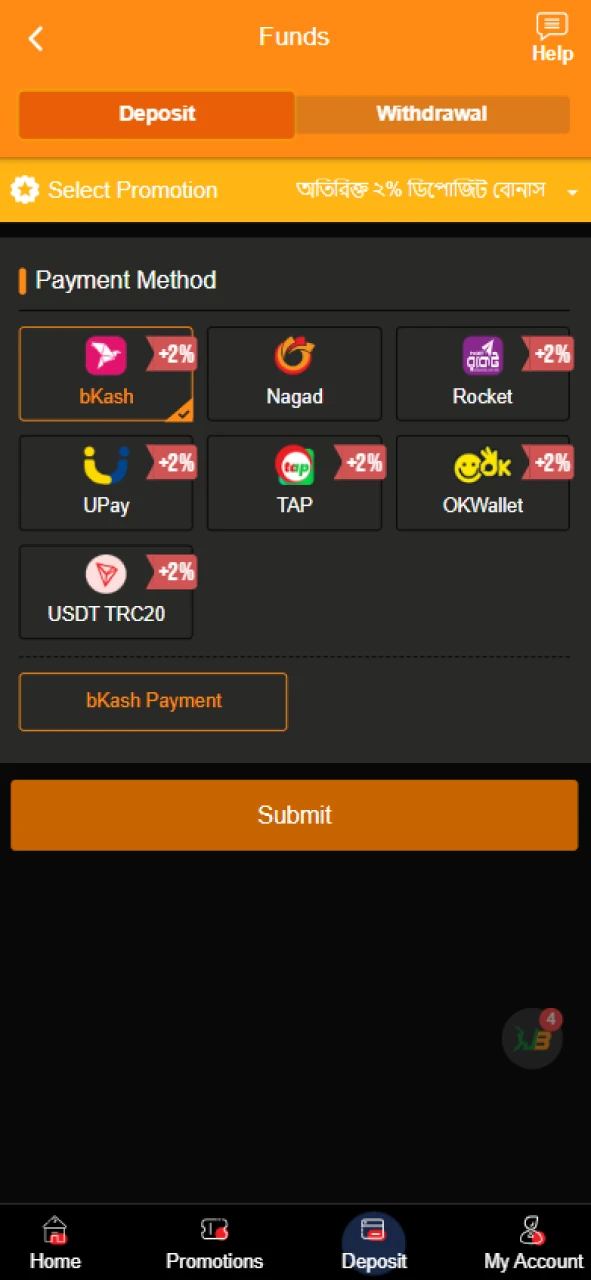
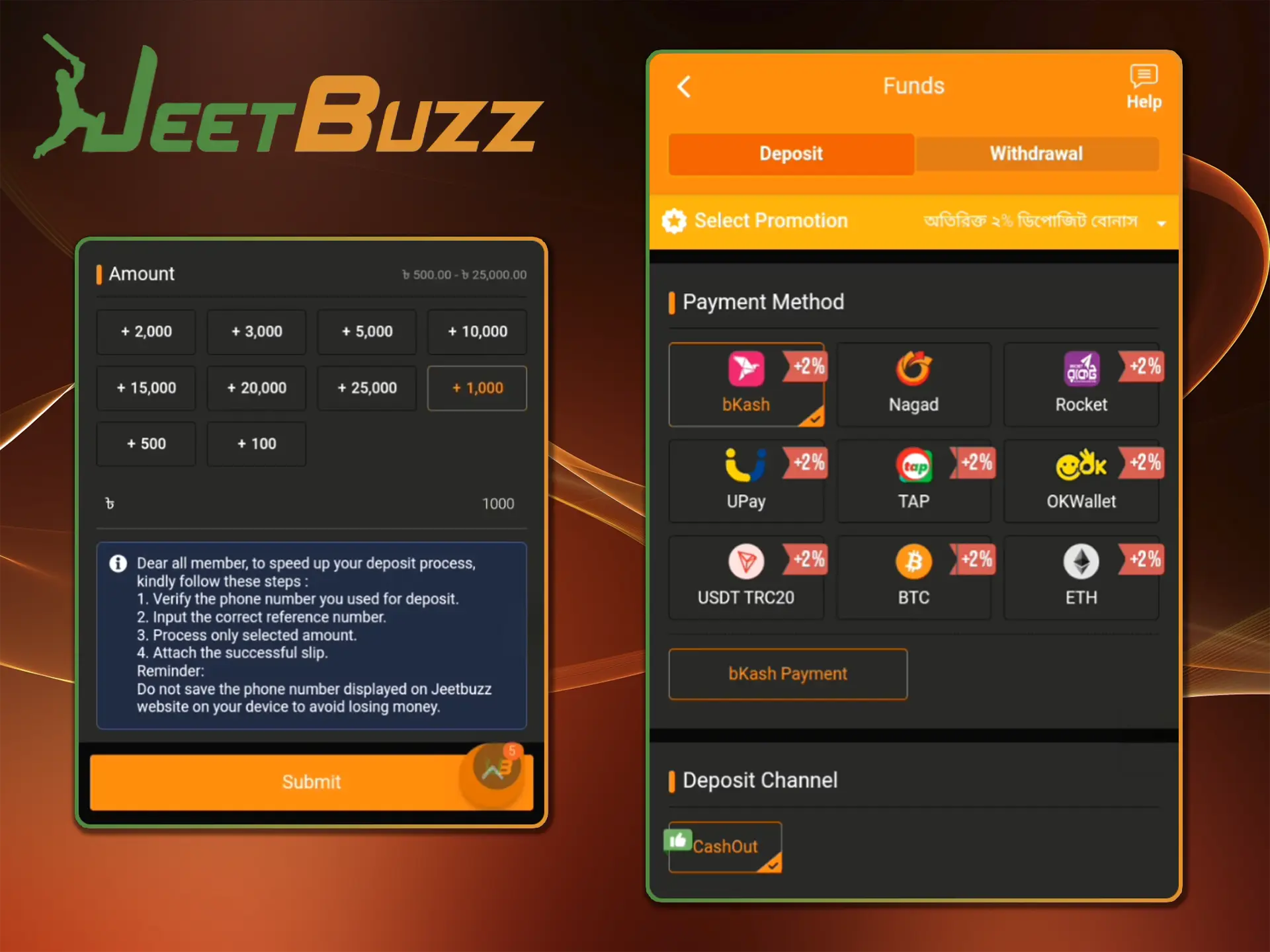
Log in, open the “Deposit” section, choose a payment method and enter the amount (minimum ৳500). Confirm the transaction; funds are usually credited within 5–30 minutes.

Make a deposit through the Jeetbuzz app.
3

Place a Bet or Play

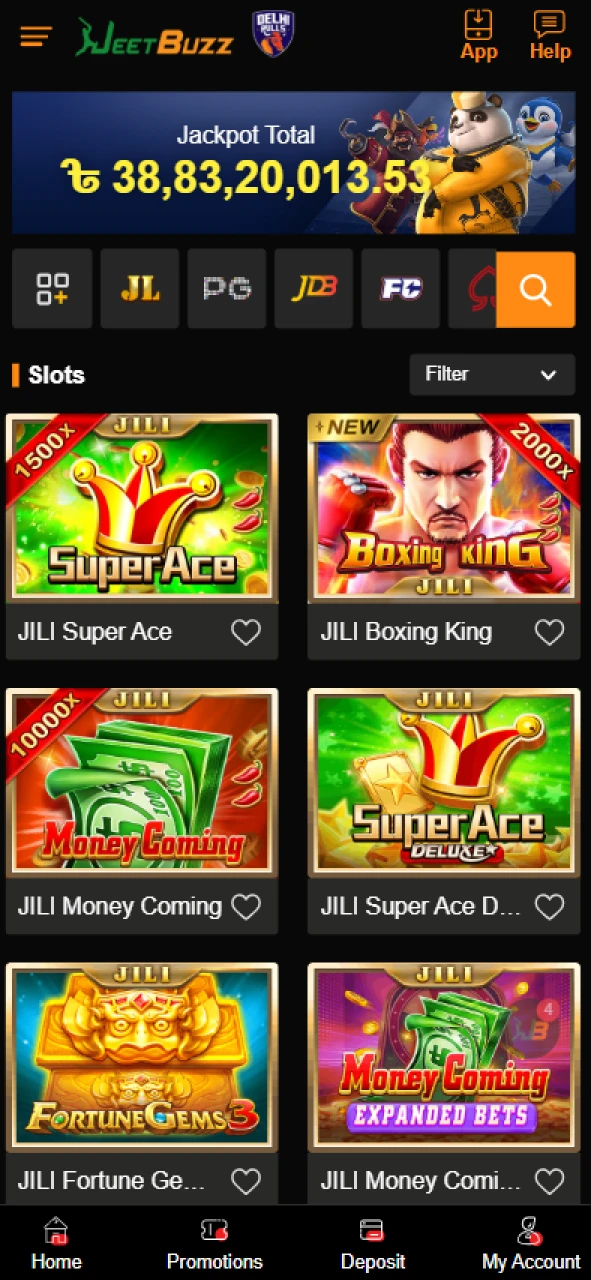
Open the “Sports” section, choose the sport and match, check the odds and add your pick to the bet slip. Enter the stake and confirm the bet. Casino fans can open slots or live casino games instead.

Place a bet or choose a game in the Jeetbuzz app.

How to Log In via the App

If you already have a Jeetbuzz account, use it in the app; there is no need to register again. To log in:

  1. Open the JeetBuzz app on Android or the mobile website on iOS.
  2. Press the “Log in” button on the main page.
  3. Enter your username and password, then press “Log in”.

The Android app also supports biometric login for faster access.

Log In via App
Log in to your Jeetbuzz account in the Android app.

How to Deposit Money?

You can also make deposits in the app. The minimum deposit is ৳500, and funds are usually credited within 5–30 minutes:

  1. Open the app on your mobile device and log into your account.
  2. Press the “Deposit” button on the main page.
  3. Choose bKash, Nagad, Rocket, a local bank transfer or USDT.
  4. Enter the amount and complete the payment in your wallet or bank. bKash, Nagad and Rocket accept ৳500–৳25,000 per deposit, and a local bank transfer starts from ৳1,000.
Deposit Money
Deposit money in the Jeetbuzz app with bKash, Nagad or Rocket.

How to Withdraw Winnings?

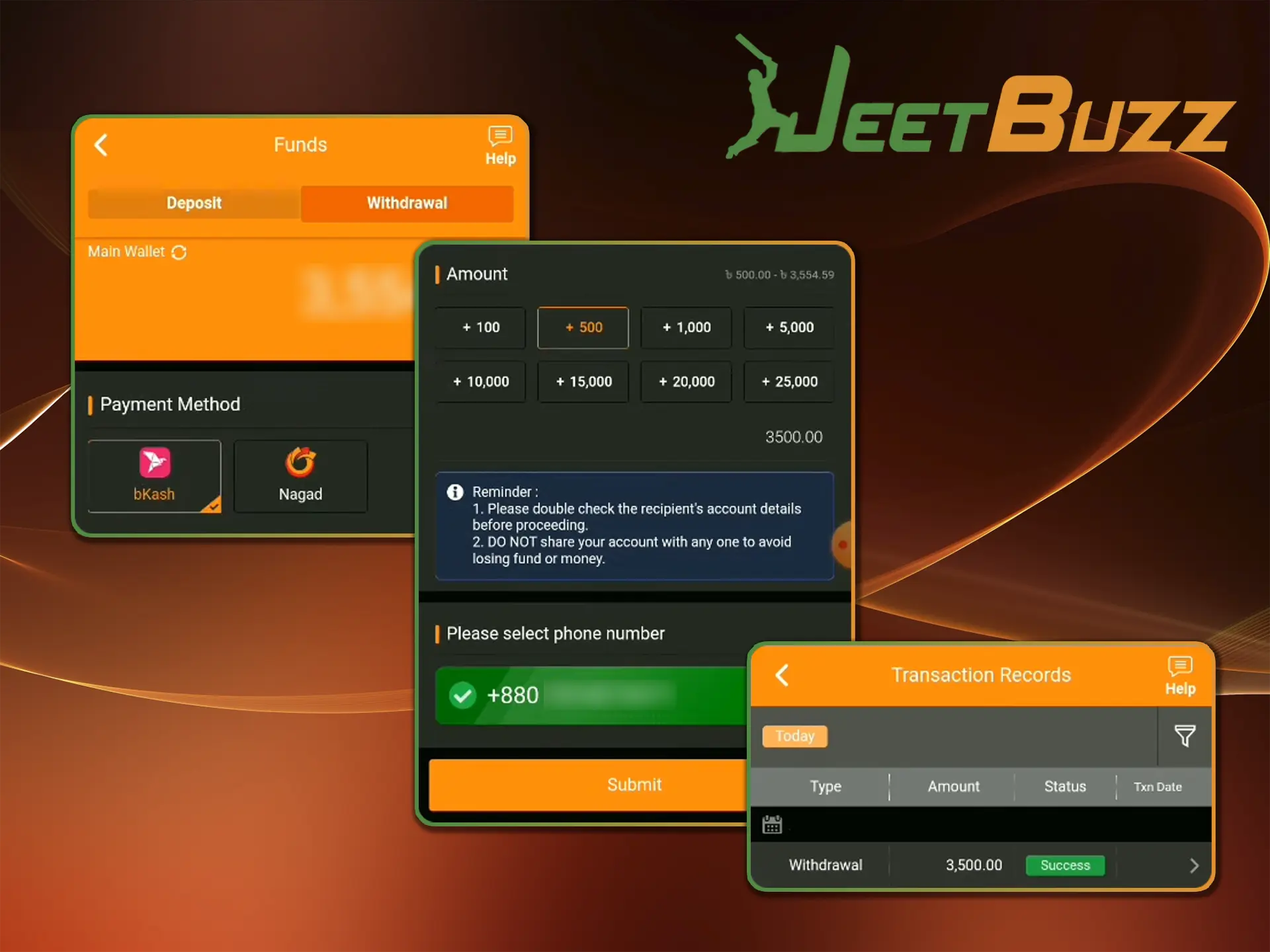
Just as you deposit through the app, you can withdraw your winnings there:

  1. Open the app on your mobile device.
  2. Open the account menu and switch to Withdrawal.
  3. Choose bKash, Nagad, Rocket or a local bank, then enter your account details and the amount.
  4. Check that the details are correct and confirm the request.

bKash, Nagad and Rocket pay out ৳500–৳25,000 per withdrawal, and a local bank transfer ৳30,000–৳50,000. Before a withdrawal, Jeetbuzz verifies the account with a government photo ID, a selfie holding the ID and a bank statement or utility bill.

Withdraw Money
Withdraw winnings from your Jeetbuzz account in the app.

Jeetbuzz Bonuses in the App

App users get the same promotions as on the website, and there is no separate app-only bonus. New players choose one welcome bonus with a deposit of at least ৳500:

  • Sports: 77% up to ৳7,777, 7x turnover;
  • Slots & Fishing: a fixed ৳1,077 after ৳21,777 turnover on the deposit day, 10x;
  • All games: 100% up to ৳1,000, 15x (Cricket Market excluded);
  • Live casino & table: 50% up to ৳10,000, 30x;
  • Crash: 50% up to ৳10,000, 20x.

Turnover is counted as effective turnover. Regular players also get reload bonuses of 2–6% depending on their VIP level. Full terms are on the Jeetbuzz bonuses page.

Jeetbuzz App Features

The Jeetbuzz app brings the main features of the website to Android. Sports bettors and casino players get a clear interface, smooth navigation and secure access with biometric login. The app supports multiple languages, live betting, exchange betting on cricket, tennis and soccer, and deposits and withdrawals through local payment methods. Here is a closer look at the key features.

Live Betting Features

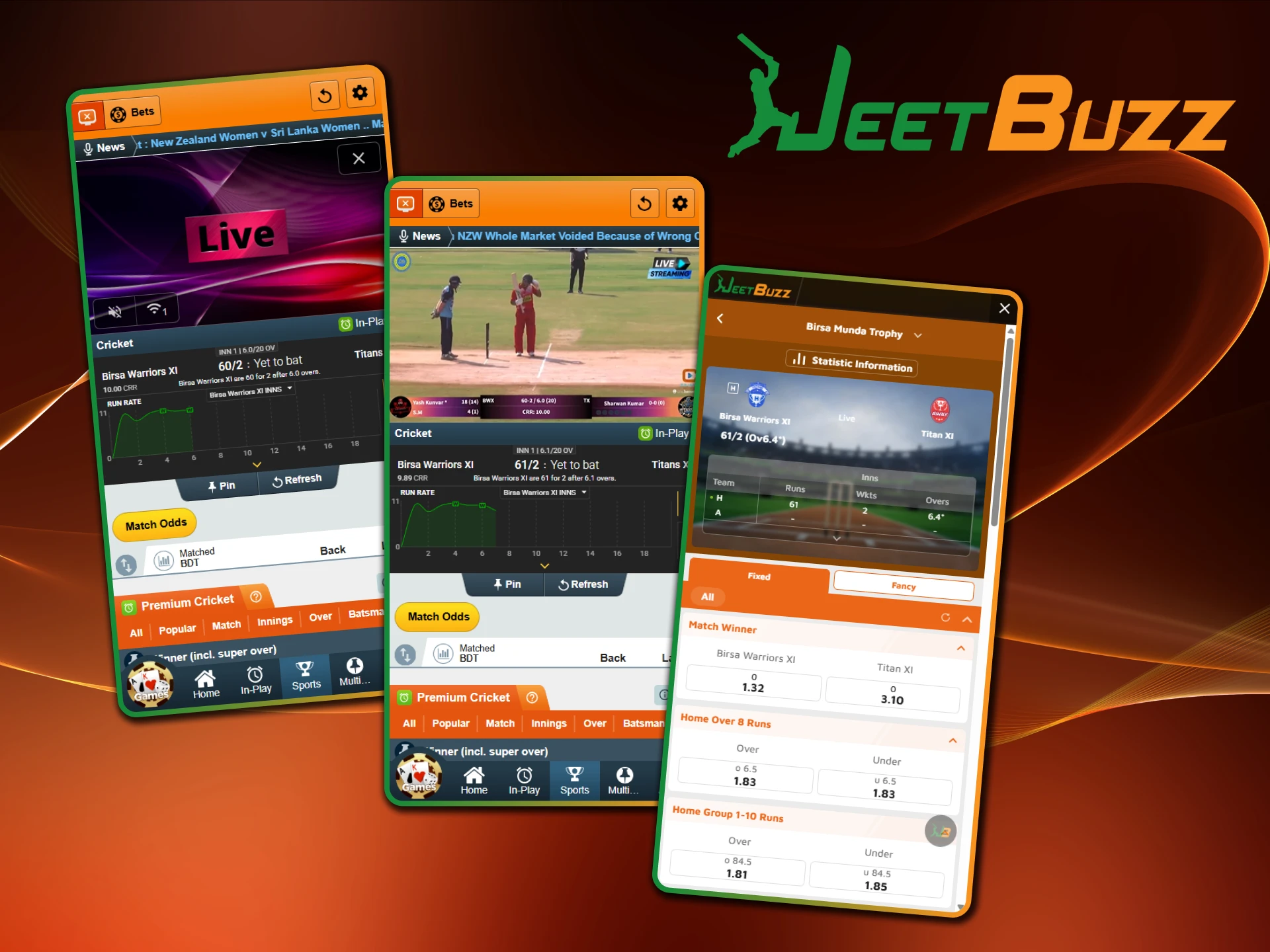
Live betting on Jeetbuzz lets players bet while a match is in progress, with odds that update as the game develops. Cricket, soccer and tennis are available in both the sportsbook and the betting exchange, and other sports appear whenever their events are listed. The odds stay up to date, so bets can be placed quickly.

Availability Around the clock, depending on the event schedule
Supported Sports Cricket, soccer, tennis and more
Markets Sportsbook and betting exchange
Live sports betting with real-time odds in the Jeetbuzz app.

User Profile Features

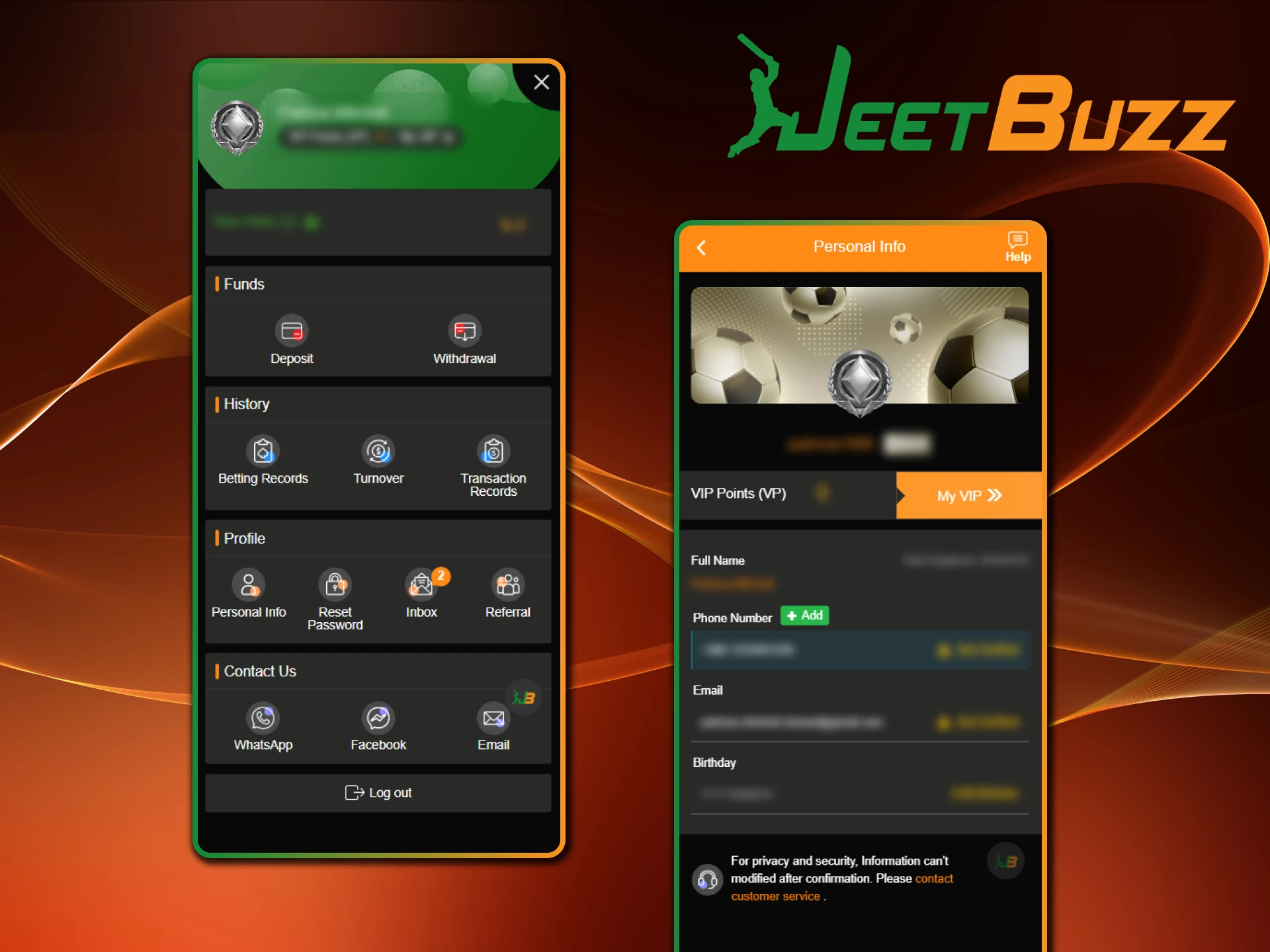
The Jeetbuzz app has a user profile section where players manage their account. They can update their personal details and password, check the balance in real time and open the transaction history to review past deposits, withdrawals and bets.

Account Settings Login details and security settings
Balance Display Real-time account balance
Transaction History Deposit, withdrawal and betting history
Personal Details Update contact details and password
Manage your profile and account settings in the Jeetbuzz app.

Notification Features

The Android app can send notifications about live bets, match results and promotions. Players choose which alerts they want and can switch push notifications on or off in the app or phone settings.

Notification Types Live bets, match results, promotions
Settings Push notifications on or off in the app or phone settings
Stay updated with alerts from the Jeetbuzz app in Bangladesh.

How to Update Jeetbuzz App to the Latest Version?

If you want the Jeetbuzz app to work as efficiently as possible, you need to install the latest update. Newer versions fix bugs and glitches, add new features and improve security, so it is worth updating as soon as a new release is out. To update the app:

  1. Open the website in the mobile browser of your device.
  2. Open the app download page and choose Android.
  3. Wait for the download to finish and install the new version. The old version of the app will automatically get switched to the newer one.

On iOS, the mobile website always loads the latest version, so there is nothing to update.

Get the Latest Jeetbuzz App
The JeetBuzz app will notify you when a new version is released and you can read what new features have been added.

Is the Jeetbuzz App Safe?

The Jeetbuzz app is safe to use when you download it from the official Jeetbuzz website. Jeetbuzz is operated by Northern Lights Limited Holdings Limited and licensed and regulated by the Government of the Autonomous Island of Anjouan, Union of Comoros, under License No. ALSI-202410030-FI1. Data and payments are protected with SSL encryption, accounts are protected by a password and biometric login, and withdrawals require account verification. Only players aged 18 or over can use the app.

Download Source Official Jeetbuzz website only
Encryption SSL encryption for data and payments
Login Security Password and biometric login
Account Verification Government photo ID, a selfie holding the ID, a bank statement or utility bill
License Anjouan, License No. ALSI-202410030-FI1
Security of the Jeetbuzz app: encryption, biometric login and KYC checks.

F.A.Q

Can I Change the Language in the App?

Yes. The app supports multiple languages, including English and Bengali, and you can change the language in the settings menu.

Does the App Have a Responsible Gaming Feature?

Yes. Jeetbuzz provides responsible gaming tools, including deposit limits and self-exclusion, to help players stay in control of their gambling.

Are There Exclusive Promotions for App Users?

No. App users get the same bonuses and promotions as on the website.

Can I Use the Jeetbuzz App on Multiple Devices?

Yes, you can install the Jeetbuzz app on several Android devices. Log in with the same account to see your balance and betting history; each person may hold only one account.

Is There a Jeetbuzz App for iPhone?

No. Jeetbuzz offers an Android APK only. iPhone and iPad users open the mobile website in Safari and can add it to the home screen.

Updated: